Changelog
26.4.0 — A Brand-New Cycle Report
The focus of this release has been on rebuilding the cycle's history report so that it's more accurate and useful. New features Cycles start to finish When you start a cycle, Saga PM now snapshots its membership and points as a forecast baseline. Completing the cycle produces a second snapshot. The difference between…
Read more
26.4.0 — A Brand-New Cycle Report
The focus of this release has been on rebuilding the cycle’s history report so that it’s more accurate and useful.
New features
Cycles start to finish
When you start a cycle, Saga PM now snapshots its membership and points as a forecast baseline. Completing the cycle produces a second snapshot. The difference between the two along with a record transition stream allows for an accurate and comprehensive review of the cycle.
Forecast accuracy replaces commit accuracy
The cycle report’s headline metric is now Forecast Accuracy; this is the planned vs actual diff. A new Forecast panel sits under it with the say/do numbers broken into four buckets:
- Delivered — committed and completed.
- Rolled over — committed, unfinished, carried forward.
- Canceled — committed and explicitly canceled (a.k.a. never-do).
- Removed — committed, then removed before ending the cycle.
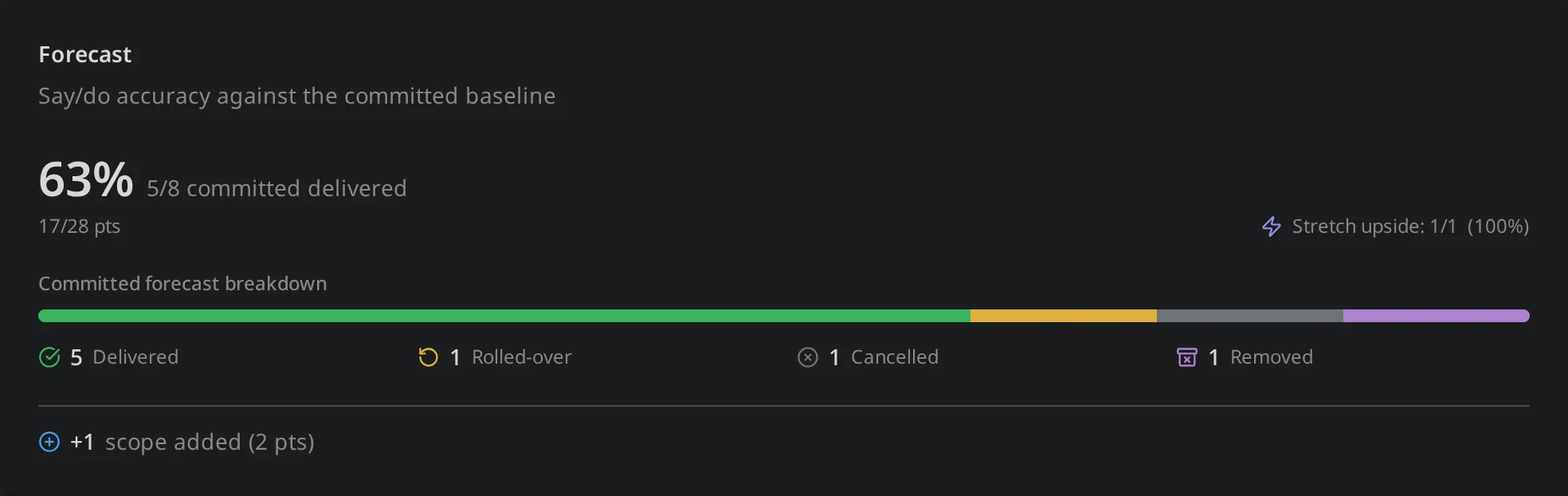
Canceled work no longer counts as delivered. This was always the intention as cancelling work is the euqavilent to the sentiment “we committed to this work, but have now determined it’s not worth doing”. It’s similar to removing work because in both cases the team committed to the work and decided before ending the cycle to eject it. The key difference being that removed work may still be brought into a future cycle, but canceled work will never be worth doing.
Visible Scope creep during planning
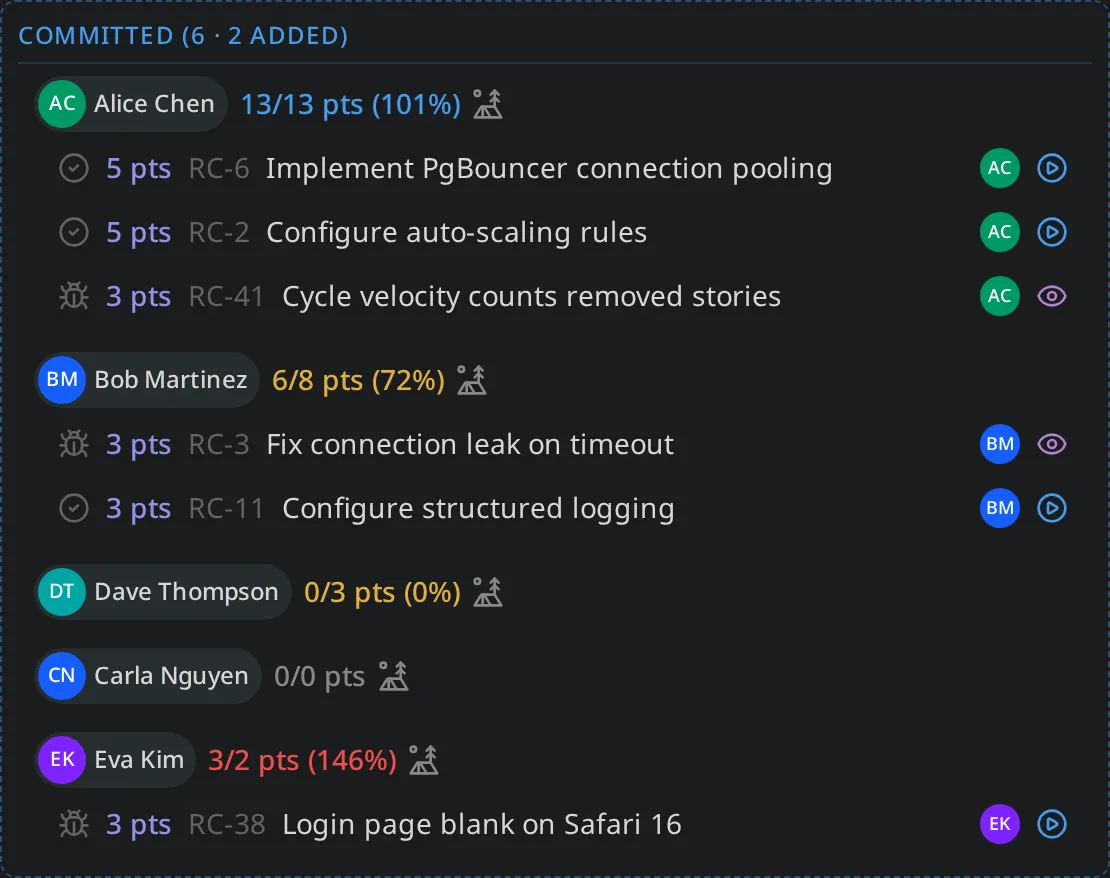
There’s a new breakdown that’s visible on the planner that helps the team see the number of records added to the active cycle. Now pre-panning can take into consideration the impact of this scope creep while planning the next cycle.
- Cycle rows read
Committed (6 · 2 added)while the cycle is running.
Churn: work that came and went
A baseline and an outcome are two points in time, and a record pulled into a cycle mid-flight and dropped before completion appears in neither. Previously these record transitions where effectively invisible on the report.
Saga PM now reconstructs that history from the record transition stream. The forecast panel shows a Churn line next to scope added and the records list captures the transient record as well.
A records list on the cycle report
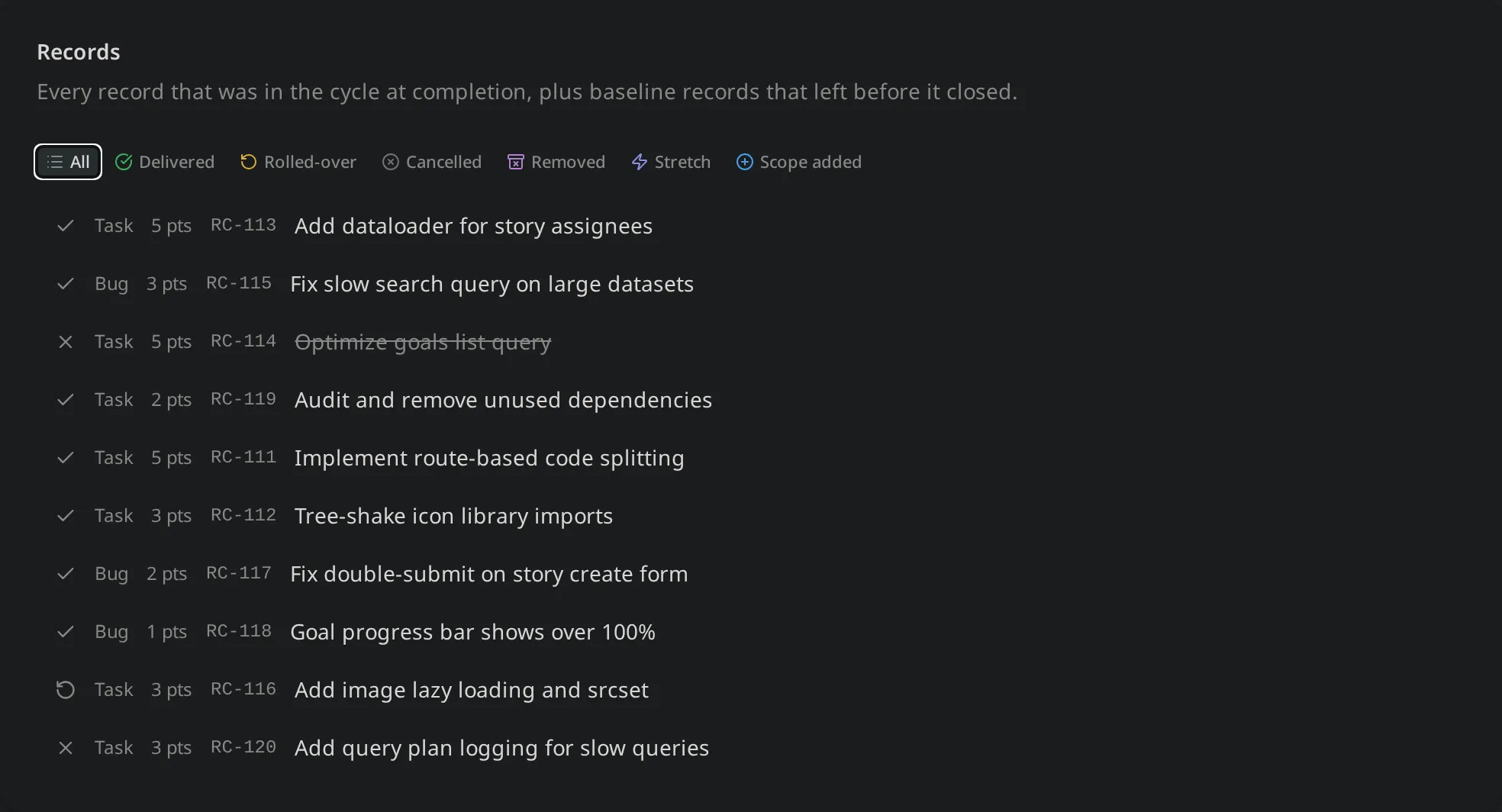
A new Records section lists everything that was in the cycle (or passed through it), filterable by forecast bucket. Making it significantly easier review not only the numbers but also the tangible work completed in the cycle, all in one place.
Improvements
Guardrails on cycles and bulk actions
The reports above require some computationally expensive work that prompted setting proper limits to safeguard the platform. A few new limits:
- Cycle membership is capped at 500 records, enforced when the cycle starts. Planning is deliberately exempt, so bulk-dumping candidates, shuffling rollover work, and triaging down is uneffected.
- Starting an empty cycle is refused. We found this was mostly accidentental and the result was it poisoned a team’s metrics, now it’s prevented.
- Bulk mutations are capped at 1,000 ids, and bulk tagging and reassignment are capped at 50,000 pairs. Both reject rather now, rather than truncate, which prevents silent partially completed mutations.
Removing a record from a running cycle asks first
Pulling a record out of an active cycle isn’t free: baseline work counts as Removed and lowers forecast accuracy, and mid-cycle work shows up as churn. That removal now prompts for confirmation and explains the cost. Records in a completed cycle can no longer be removed at all.
Fixes
- The velocity chart rendered nothing, regardless of the record type selected. It now renders, with a proper empty state for cycles that completed zero points.
- The velocity chart also ran backwards — the axis went newest-to-oldest, so the rolling average and the “trending up by N% this cycle” footer were both reading the wrong direction. Fixed here and in the forecast accuracy chart, which had the same problem.
- Outline buttons were invisible in light mode, at a 1.06:1 contrast ratio. They now sit at 18.62:1 in light and 10.75:1 in dark, across all 44 usages.
- Three of the five chart colors read as grey, and a fourth was effectively invisible on a white card. The palette is now eight validated categorical colors, identical in both themes, each clearing 3:1 on both card surfaces, with the worst adjacent pair separated by ΔE 14.8 under protanopia. Status colors: progress, at-risk, and off-track remain unchanged.
- Search highlighting no longer borrows a chart color, so a match marker can’t read as a deletion.
- The projects Gantt was empty on a cold load until you switched the team filter and back. Fixed, along with five other places where an empty team selection was read as “no teams” instead of “no filter.”
- Self-assigning a record lit up your own notification bell. Notifications about your own actions are never actionable now.
- The cycle picker’s “None” row did nothing. It now clears the record’s cycle.
- Bulk tagging failed past a certain size — tagging 1,000 records with 22 tags returned a raw database error. The query is now built so its size stays constant regardless of input.
API changes
Two changes are visible to anyone using the GraphQL API directly:
updateCycleno longer acceptsstatus. It previously wrote the status verbatim, bypassing the capacity, rollover, and empty-cycle guards. This made “startCycleis the only path to ACTIVE” untrue. UsestartCycle,completeCycle, andcancelCycle.- Notification
origin,actionability, andvariantare now enums,UPPER_SNAKEend to end, where they were previously strings.
Under the hood
Most of this release’s weight sits below the surface, in the groundwork the reports above depend on.
- Every change to a record is recorded, without exception. That’s what forecast accuracy, churn, and flow metrics read from, so the reports can describe what actually happened rather than only what’s true right now. A record’s history is kept for as long as the record exists.
- Bulk actions are faster. Changing 500 records at once is now a couple of database operations instead of hundreds.
- A whole category of blank-field bugs is now caught before release rather than showing up as an empty panel in the app. The same work uncovered a few dormant ones, including two project statuses that could never display.
- More of the app is verified automatically on every change, including the interface itself, reducing dependence on manual regression testing and more focus on feature and exploratory testing.
26.3.0 — Move Records Between Projects, Plus Search and Nav Polish
This release has a narrower focus. The headline is a new way to move records between projects: quick changes go through the familiar properties popover, while a brand-new advanced edit modal — opened from that same popover — handles the cases that need more control. Also included are a handful of small fixes and…
Read more
26.3.0 — Move Records Between Projects, Plus Search and Nav Polish
This release has a narrower focus. The headline is a new way to move records between projects: quick changes go through the familiar properties popover, while a brand-new advanced edit modal — opened from that same popover — handles the cases that need more control. Also included are a handful of small fixes and tech-debt pay down.
New features
Reassign a record to another project
Records now have a first-class Project property on the properties panel — both on the detail page and in the actions tray. You can move a record to a different project, or un-assign it entirely, without hand-editing its milestone the way you had to before.
There are two paths: a quick popover that will feel familiar to how existing properties are managed and a new advanced edit modal for with additional options such as creating and attaching a new project on-the-fly.
The quick popover moves the record onto the target project’s default milestone — one click, done. Filter by team or project status to find the project even when you can’t recall the project id.
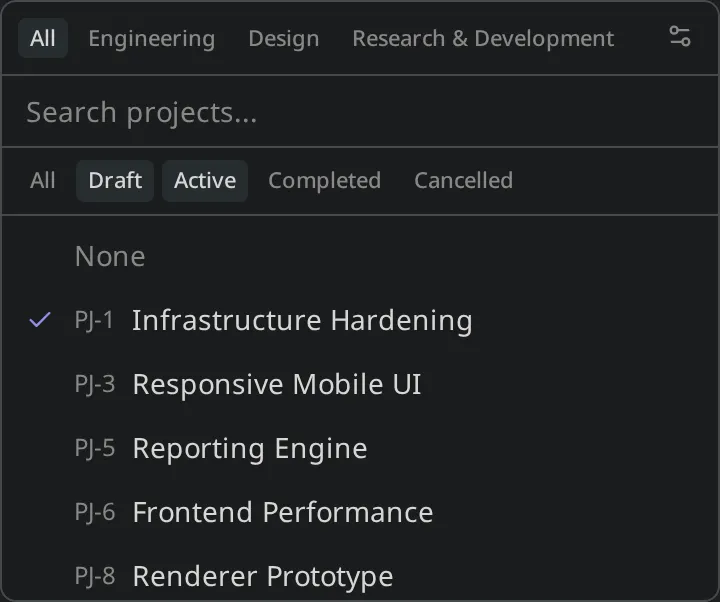
The advanced modal gives you more control: pick an explicit milestone within the destination, filter the project list by team and status as you search, or switch to create a brand-new project and drop the record straight into it.
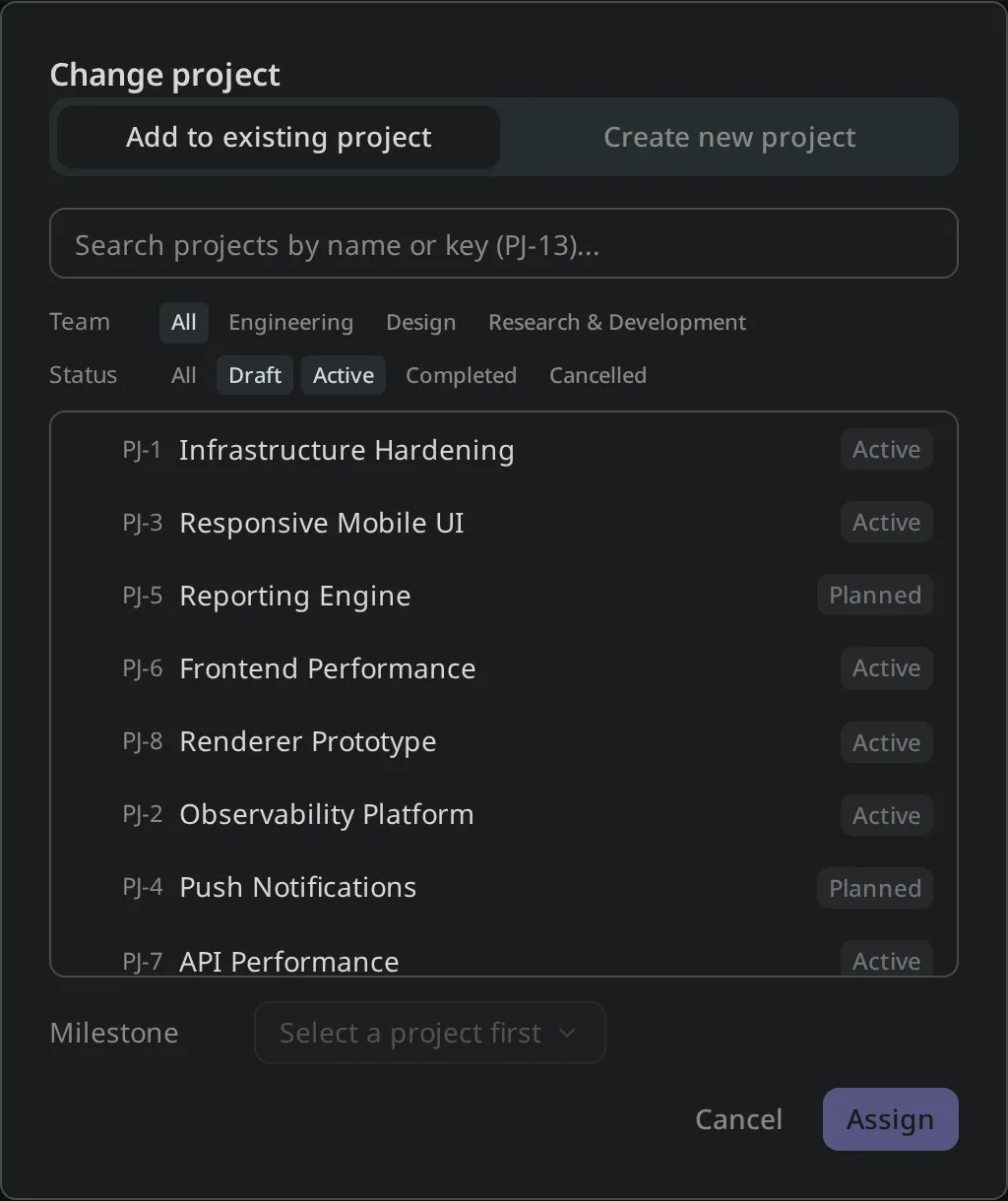
Why a modal — a new pattern, used deliberately
The advanced modal is a new interaction pattern for Saga PM, so it’s worth explaining where it fits and why we reached for it here.
Most property edits in Saga PM happen in popovers — small, anchored surfaces that open right where you’re working and let you change one thing without leaving the page. That’s deliberate: a popover trades flexibility for clarity. By keeping the area small and the actions narrow, it stays comprehensible at a glance and doesn’t pull you out of your context. The Project picker popover above is exactly that — pick a project, done.
But some actions genuinely need more room than a popover can give without becoming cluttered. A modal is the heavier tool: more space, more controls, and a more deliberate context switch. We use modals sparingly precisely because that switch is an interruption — so when we open one, it has to earn it by doing something a popover can’t.
Creating a new project and attaching the record to it in one flow is that something. Without it, this is a multi-step detour: leave the record, go create a project, come back, remove the record from its old project, then re-attach it to the new one — a lot of busywork for what is actually a common moment. As work progresses, you often realize a record no longer belongs in its current project, because the project’s scope has narrowed or the record’s scope has grown into something of its own. The advanced modal collapses that whole detour into a single, uninterrupted action.
That reflects how we think about projects in Saga PM. Projects are how you organize work in the way that makes sense to you — and that understanding changes over time. The goal isn’t to lock in the structure you guessed at on day one; it’s to make re-balancing cheap as your understanding sharpens. Moving a record, or spinning up a new project to hold it, should feel like a natural part of that iteration rather than a chore you avoid.
Improvements
A wider command palette
The top-nav search dropdown that hosts the command palette (⌘K) was a touch narrow, so long entity titles truncated more aggressively than they needed to. It’s now 30% wider, so record and project titles have room to show in full. The spacers on either side absorb the change, so the rest of the top bar is untouched.
Fixes
- The changelog icon’s amber state is now the right orange. When a new changelog entry is available, the gift icon in the nav lights up — but it was using a desaturated tan that read as muted next to everything else. It now uses the same
sidebar-primaryorange as active nav icons, the command-palette shortcut badge, and the team-selector unread dot, so it matches its neighbors.
Under the hood
Building record reassignment pushed a couple of internal cleanups worth noting: the team-scoped pickers across the app are consolidating onto a single shared TeamScopedPicker (the cycle picker has already migrated, with more to follow), and the resolver’s event bus is now a narrow interface, which makes the dual progress-bar broadcast easier to test in isolation. Our CI also got faster — frontend tests now run inside the Playwright image and Go lint tools are cached between runs.
26.2.2 — Live Notifications, a Richer Jira Import, and SSO Polish
This release builds on the notification rewrite from 26.1.0: every notification type now renders live, so names stay correct as people and entities are renamed. Alongside that, Jira import gets severl fixes: epics and initiatives correctly come across as milestones and projects, comments keep their formatting and…
Read more
26.2.2 — Live Notifications, a Richer Jira Import, and SSO Polish
This release builds on the notification rewrite from 26.1.0: every notification type now renders live, so names stay correct as people and entities are renamed. Alongside that, Jira import gets severl fixes: epics and initiatives correctly come across as milestones and projects, comments keep their formatting and timestamps, and story points round-trip. We also polished SSO sign-in and brought @mentions to description editors.
New features
Notifications render live
In 26.1.0 we rebuilt the watcher × notification pipeline. This release finishes the job: every notification type — comments, mentions, assignments, status changes, check-ins, deletions, idea promotions, relationship blocks, record moves, and entity creation — now flows through a single live-rendering path.
Practically, that means a notification shows the current name of the user or entity it references, resolved at render time rather than baked in when the event fired. Rename a project or a teammate and the notifications that reference them update to match, instead of preserving whatever the name was the moment the event was created.
Emails are deduplicated at the source. The email queue is now co-located with the in-app notification insert, so a single event can no longer produce a duplicate email under concurrent fan-out — one event, one email.
The bell got a paginated list and tabs. The notifications surface now paginates with the same load-more pattern the list pages use, and the bell picks up tabs plus a read-state badge rule, so a long history no longer loads all at once and unread is easier to scan.
Behind the scenes, notification mutations now count and alert on publish failures, giving the team visibility into the rare delivery hiccup rather than letting it pass silently.
Solving Jira import bugs and improving ADF conversion
Import gained a substantial round of fidelity and reliability work:
- Epics and initiatives now correctly map to your hierarchy. Jira epics import as milestones and initiatives as projects when selected.
- Comments come across intact. Comment bodies import with their original formatting (from Jira’s ADF) and timestamps, and block/embed smart-link cards are preserved rather than dropped.
- Cleaner descriptions. Descriptions import via rendered HTML rather than raw ADF, and Jira-hosted images — which would 403 once detached from Atlassian — are stripped instead of importing as broken links.
- Story points round-trip. Points import with awareness of the source field’s scale, so estimates land on the right values rather than being copied verbatim.
- Per-project team assignment. Imported records respect the per-project team selection you make in the wizard.
- More reliable, fewer surprises. A stable sort order on the import query stops issues being silently dropped during paging, the end-date filter is now inclusive of the whole day, and you get a notification when the import completes.
Rollback got attention too: rolling back a project delete now cascades to its child milestones, and you’re notified when a Jira rollback finishes.
Improvements
SSO sign-in polish
A cluster of fixes makes SSO workspaces smoother to sign into and set up:
- Providers show on the identify step. The tenant login screen now surfaces the configured SSO providers up front, so users see how to sign in rather than guessing.
- Names survive SSO logins. A user’s name is now preserved across SSO sign-ins, and identity changes in your IdP sync back to the app via webhook so profile data stays consistent.
- Clearer errors. An unverified-email sign-in failure now maps to an actionable message instead of a generic error, and SSO setup handles a missing auth config gracefully with the settings UI gated appropriately.
- Logged-in users hitting
/loginare now redirected away instead of seeing the form again.
@mentions in descriptions
@mentions worked in comments; now they work in entity description editors too. Mention labels are preserved across the save → edit roundtrip, and chip names resolve from the live member map at render time, so a mention shows the member’s current name.
Steadier record lists
- The records list “load more” no longer hangs the tab — additional rows now append to the list instead of triggering a full rebuild, which is also faster.
- Row IDs with 3+ digits no longer wrap onto a second line.
Fixes
- In-app notifications for non-routable entities. Events on entities without a detail-page route now still produce an in-app notification instead of being skipped.
- Tag rollback orphans cleaned up. Rolling back no longer leaves orphaned tags behind, and the records tag filter resets correctly afterward.
- Bounce protection. Recipients on reserved TLDs are dropped before reaching the email provider, protecting the workspace’s sending reputation from guaranteed bounces.
- Quieter row actions. The notification row action button uses a ghost variant so it sits more quietly in the list.
recordTypeIDandmilestoneIDare now accepted inUpdateRecordInput.
26.1.0 — Welcome Page, Notifications Overhaul, and a New Release Cadence
Two headline features in this release: a real Welcome page when you sign in, and a rewritten watcher × notification system with a preferences UI. We also flipped the release-tag scheme to a calendar-year format — this is the first release on the new pattern, so the version jumped from 1.16.0 to 26.x. New features A…
Read more
26.1.0 — Welcome Page, Notifications Overhaul, and a New Release Cadence
Two headline features in this release: a real Welcome page when you sign in, and a rewritten watcher × notification system with a preferences UI. We also flipped the release-tag scheme to a calendar-year format — this is the first release on the new pattern, so the version jumped from 1.16.0 to 26.x.
New features
A welcome page that actually welcomes you
The placeholder at /[tenant]/ is replaced with a launchpad: my active work, goals and projects you own, what you’re watching, and active cycles. Each section renders through the familiar RecordRow / GoalRow / ProjectRow components the list pages use.
The active-cycles section offers a unique list view of all active cycles relevant to the user. Previously the quickest way to an active cycle was through the cycle planner, this eliminates that navigation requirement.
Notifications, rewritten
Watchers existed before this release, but only for goals and projects, and the fan-out was a bit ad-hoc. This release replaces the whole pipeline.
Watchers now cover every entity. Records and ideas are watchable too, with a WatchButton exposed on detail pages, the actions tray, and the properties pane. Auto-watch fires on create, on assignment, and on check-in across all four entity types — the same opt-in pattern goals and projects had, now consistent everywhere.
Mention × watcher dedup. If you’re @-mentioned in a comment and you watch the entity, you used to get two notifications for one event. A new partial unique index on notification_source_event_id collapses those into one row, race-safe under concurrent fan-out (with a separate metric on the rare collision so it stays visible).
IDEA_PROMOTED fans out to watchers. Previously this event only notified the original submitter; now anyone watching the idea gets told when it becomes a record, project, or goal.
Every emit goes through one helper. A single emit() function is the only path from the resolvers to the notification consumer. This feature is more internal facing, allowing the team better insights and debugging for event processing.
Notification preferences at /profile
The flip side of opt-in watchers is opt-out preferences. The new /profile page exposes a channel × type grid: in-app and email columns, one row per notification type. A master mute toggles the whole grid; mandatory rows (security events, billing) are starred and require at least one channel.
DPA acceptance at workspace creation
Every new workspace now requires explicit acceptance of the Data Processing Addendum at sign-up, with the accepted version, timestamp, and accepting user captured on the tenant row. The acceptance event appears as a TENANT/dpa_accepted entry in Settings → Activity alongside the workspace’s creation event.
This backs the public commitment we made when we launched trust.sagapm.io and sagapm.io/dpa — every new tenant is now provably bound to a specific DPA version at sign-up.
Improvements
Form primitives standardized on bits-ui
The radio group picks up a small UX upgrade in the process: the original markup had no card-level selected state, so the only signal was the radio dot itself. Selected radio cards now highlight the border and add a faint primary tint, which is much clearer in the Jira import wizard’s structure and subtask pickers.
Fixes
- Relate picker dropped display-ID hits. Typing
id-52into the relate picker on an entity detail page returned 0 results, even when the target existed and the backend matched it. The picker now matches the command palette’s behavior; the two surfaces share one search contract again. - Improved description readability. Read-only entity descriptions were rendering adjacent paragraphs 4px apart — a bit too tight, resulting in multi-paragraph descriptions reading as a wall of text. Paragraph margins bumped from
0.25remto0.75em, with first/last-child resets so single-paragraph descriptions stay flush with their container and look unchanged.
A new release cadence and versioning scheme
Up to v0.9.1 we shipped on a rolling nightly-to-prod cadence — every commit on main rolled to production automatically, with version bumps done by hand. Our release and documentation process is maturning so no-more nightly main branch deploys, instead a more controlled and deliberate release process.
Alongside the new cadence, we’ve moved off SemVer and onto calendar versioning (CalVer) — which is why this release jumped from 1.16.0 straight to 26.1.0. Under SemVer the leading 1 tracked breaking API changes; useful in theory, but it told you nothing about when a release shipped. CalVer fixes that: the major number is now the two-digit calendar year, so 26.x is 2026, and you can read a release’s age at a glance.
Within the year, the minor number increments with each feature release and the patch number covers follow-up fixes. This is the first release on the new scheme — there’s no 2.x through 25.x, we skipped ahead to the current year.
1.16.0 — Tag Management, Cycle Reliability, and a Steadier App
This release focuses on refinements and bug fixes with one headline feature: Improved Tag Management. New features Improved tag management Settings → Tags is now a full management surface rather than a flat list. Tags are split into two sections — Key/Value Pairs (collapsible groups; auto-collapsed once a key has 3+…
Read more
1.16.0 — Tag Management, Cycle Reliability, and a Steadier App
This release focuses on refinements and bug fixes with one headline feature: Improved Tag Management.
New features
Improved tag management
Settings → Tags is now a full management surface rather than a flat list. Tags are split into two sections — Key/Value Pairs (collapsible groups; auto-collapsed once a key has 3+ values) and Single Keys — and each tag shows a usage count so you can tell what’s actually load-bearing.
Two new admin/owner-only operations cover the common cleanup needs: rename a key (e.g. area: → domain:) propagates to every entity carrying that key in one transaction, and delete a key removes the whole family. Per-key advisory locks serialize concurrent renames; collisions and a 50,000-row safety threshold are surfaced explicitly rather than running quietly to completion.
The native browser color picker is gone too. A curated 36-swatch palette (12 hues × 3 tints) replaces it, and tag chips now render as a colored dot + neutral chip + foreground text — so labels stay readable regardless of the swatch. The fix resolves a saga-pm report that “Add tags” text was hard to read on every theme.
Cycles stop hiding records
Two cycle-planning gaps are closed in this release.
Backlog promotion at cycle start. When you start a cycle, any records you’d assigned to it that were still BACKLOG now auto-promote to TODO in the same transaction. Previously, BACKLOG-in-cycle was counted in the swimlane header but invisible on the board (which only renders TODO / IN_PROGRESS / IN_REVIEW / DONE). Bringing a record into a cycle is a clear intent — it should reach a status the board can show.
Full state on the cycle planner. The cycle column on the planner inherited the backlog’s status filter, so DONE records assigned to active cycles silently disappeared from the planner view. The cycle column now sources directly from the cycle’s records — including DONE — so you see the full state of the work you committed to.
Lookahead on manual create. When you manually create a cycle, the configured lookahead (default 3) now spawns the future PLANNED cycles automatically. Previously this only fired on cycle complete or cancel, leaving manually-bootstrapped workspaces stuck with a single cycle visible.
Faster jumping in the command palette
The palette has long supported direct lookup like RC-42 to jump to a record. Two upgrades:
- Short-prefix listing. Typing just
gl-,pj-,rc-,id-, orml-(with the dash, no digits) now lists up to 50 of the most-recent entities of that type, ordered by display ID descending — useful for “the goal I just made” workflows. - OS-aware shortcut hint. The hotkey label shows
⌘Kon Apple OSes andCtrl+Kon Windows/Linux. The handler always accepted both; this fixes a display gap.
Improvements
Detail-page layout
The properties sidebar widens from 320px to 384px so longer team names, owners, and check-in metadata fit without truncation, and the attachments grid moves from 2 columns to 3 in the non-compact view. The biggest change: the Related entity-link field moves out of the cramped properties sidebar into its own section directly below, mirroring the Similar Entities panel. Hover-reveal delete and an always-visible + picker replace the old inline UI. Project Owners are now editable from the project sheet too, matching the long-standing Goal Owners affordance.
Gantt timeline polish
The project timeline picks up a stack of alignment fixes:
- Month-aligned primary gridlines; week ticks suppressed at year/quarter/month zooms.
- Year zoom narrowed from 18 to 12 months so a calendar year fits the visible window.
- Today badge nudged inside the visible header so it doesn’t clip on the top edge.
- Project titles now render alongside the
PJ-#chip inside the bar at non-year zooms.
Plus a new month-header detail: months that start a quarter (Jan, Apr, Jul, Oct) prepend a bold Q1· / Q2· / Q3· / Q4· label, so quarter boundaries read at a glance without a second header tier.
Stable attachment URLs
Attachment.url previously returned a 5-minute presigned S3 URL. When users copy-pasted images between descriptions, the URL got persisted into stored content and started 403’ing minutes later. The resolver now returns a stable tenant-scoped proxy URL that signs a fresh presigned URL on each request and 302-redirects to S3, so byte transfer still goes browser ↔ S3 directly.
The editor also sanitizes HTML clipboard payloads on paste: pre-cutover content with presigned URLs is rewritten silently, and <img> tags pointing at another workspace are stripped with a clear toast — a small defense against accidental cross-workspace leaks.
Record team picker
The record properties panel was missing the Team picker entirely, meaning records couldn’t be moved onto restricted teams from the UI. The picker is now wired up everywhere goals and projects had it, with the same restricted-team and limited-team visibility hints. Private-team isolation now applies to records as well as goals and projects.
Modal scrolling
The new-idea dialog (and any other modal with long content) now scrolls inside a 90vh cap, so the save and cancel buttons stay reachable regardless of description length. Previously, pasting a long brief into a new idea could push the action buttons off-screen.
Admin trial controls
Admins can now see and adjust the trial length on demo tenants from the admin portal — both during creation (default 14 days, customizable) and afterward via a “set remaining days” control on the tenant detail page. The path also closes a bug where admin-created demo tenants shipped with no trial_ends_at set, suppressing the in-app trial banner.
Fixes
- API token scopes. 33 GraphQL mutations were unclassified and silently fell through to the
settingsscope, blocking write-scoped API tokens from making basic entity edits likecreateRelationshipandsubmitFeedback. Every mutation is now classified, and a schema-walking lint test prevents the regression class entirely going forward. Heads-up: 12 billing and workspace-creation mutations move to cookie-only as the correct security posture — API tokens withsettingsscope can no longer trigger them. - Sidebar team selector is no longer hidden when a workspace has only one team — the “All Teams” entry-point is back.
- Inspire form attachments now render in-line within the embedded editor, completing the 1.15.0 idea-promotion polish.
- HotKey help popover guard the hotkey help popover is keyed to ’?’ which was guarded against in inputs and text areas, but got missed for the TipTap editor. This resulted in the “helpful” popover obscuring the screen everytime anyone tried to type a ’?’ into a description or comment.
1.15.0 — Idea promotion: Content Carryover & Multi-Target Inspirations
Following on from the Inspirations rework in 1.13.0, this release fills out the rest of the idea-promotion workflow. Inspiring an idea now seeds the new or existing entity (Goal, Project, or Record) with the idea's description and attachments. New features Content and attachments carry over When you inspire one or…
Read more
1.15.0 — Idea promotion: Content Carryover & Multi-Target Inspirations
Following on from the Inspirations rework in 1.13.0, this release fills out the rest of the idea-promotion workflow. Inspiring an idea now seeds the new or existing entity (Goal, Project, or Record) with the idea’s description and attachments.
New features
Content and attachments carry over
When you inspire one or more ideas into a new or existing Goal, Project, or Record, each idea appends its description and attachments to the tail of the target’s description. For new entities, the appended details appear below the template, so the team’s preferred formatting is maintained.
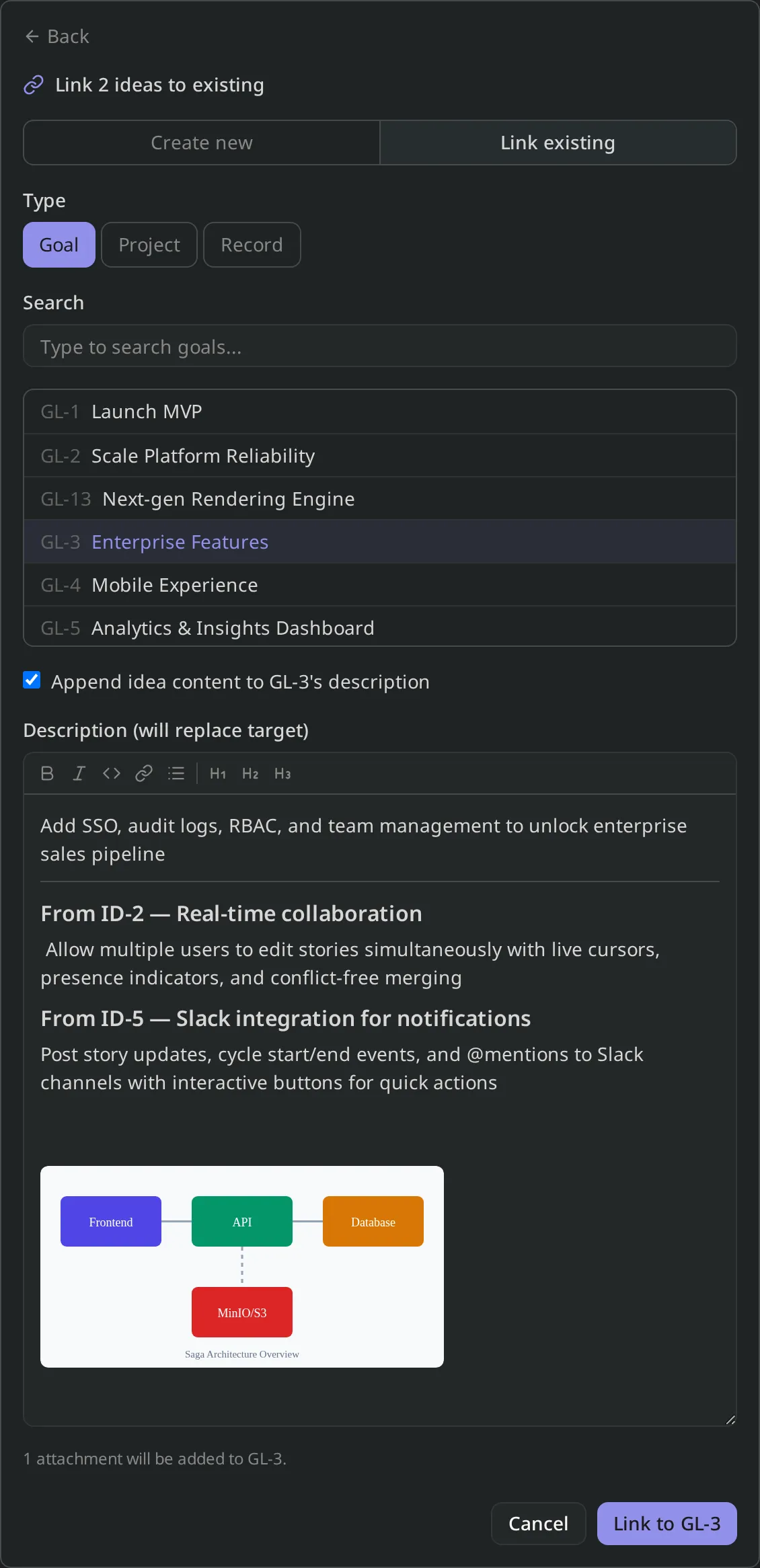
Behind the scenes, attachment storage is now reference-counted, so the same file can live on multiple entities without duplication, and a daily background sweep cleans up anything that’s truly orphaned.
One idea, many destinations
An idea no longer has to pick a single home. The same idea can now inspire a goal and a record, or two different projects, or any other combination — useful when one piece of input genuinely belongs in multiple places.
Inspirations show up on the target, too
Goal, Project, and Record detail pages now have an Inspirations section listing the ideas that, well, inspired them. Until now this link was only visible from the idea side; making it bidirectional means you can choose to not include the content from ideas directly in the description of the new entity while maintaining a single click to the full details of the original inspiration should you want to reference it.
Improvements
Permission-aware inspire picker
The inspiration form now hides goals, projects, and records you don’t have permission to edit, so you can’t pick a target only to be rejected on submit. Server-side authorization remains the source of truth — the picker filter is purely a UX improvement on top of it.
Fixes
- Attachments such as images now correctly appear in-line within the idea inspiration form.
1.14.0 — Jira Import (beta)
You can now easily migrate Jira Cloud projects into Saga PM. Connect your Atlassian workspace, pick a project, walk through a short mapping wizard, and watch the import populate goals, projects, records, comments, and attachments live. If anything looks off, you can cancel mid-run or fully roll back the import in one…
Read more
1.14.0 — Jira Import (beta)
You can now easily migrate Jira Cloud projects into Saga PM. Connect your Atlassian workspace, pick a project, walk through a short mapping wizard, and watch the import populate goals, projects, records, comments, and attachments live. If anything looks off, you can cancel mid-run or fully roll back the import in one click.
Jira import is shipping as Beta while we iterate on edge cases with early users. The core path has been validated, but if you encounter quirks, please submit feedback; we’d love to hear about them.
New features
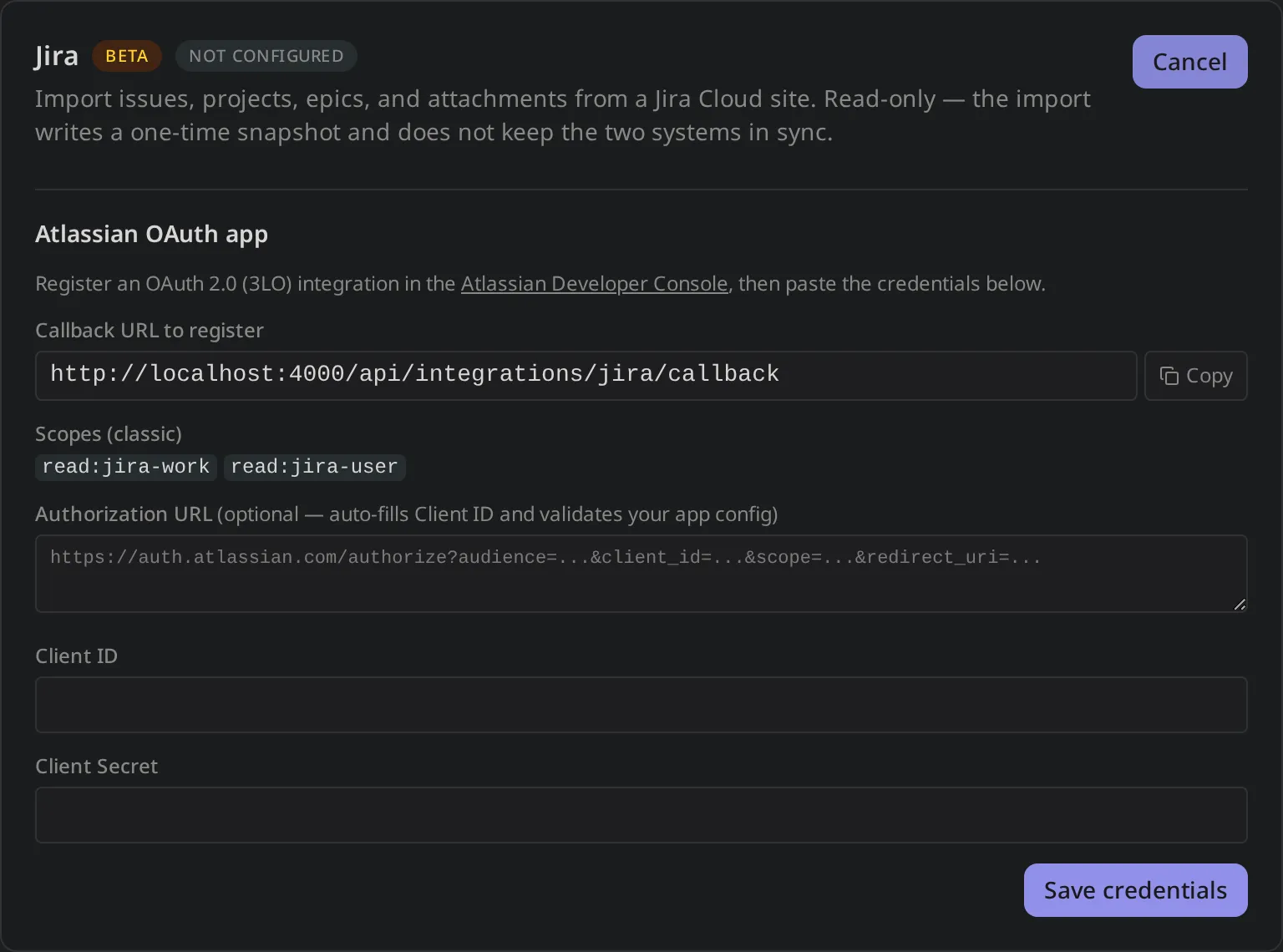
Connect your Atlassian workspace
Open Settings → Integrations → Jira and follow the OAuth flow. Saga PM acts as a per-tenant Atlassian app: each workspace registers its own OAuth 2.0 (3LO) app in the Atlassian Developer Console, pastes the client ID and secret, and connects. From there you’ll see every Jira site your account can reach, with a quick Refresh affordance if you’ve added new sites since.
We never store your Atlassian password — Saga PM only holds an encrypted refresh token, scoped to read access on Jira work and users.
A wizard to demystify the mapping process
Saga PM has similarities to Jira, but some core differences in entity hierarchy, labels, and fields require decisions on how to map your data to Saga PMs conventions. Saga PM breaks this mapping process down into a few different concrete steps.
- Project & Date window — pick the Jira project and the date range to import.
- Structure — choose how initiatives & epics from Jira map to goals, projects, and milestones in Saga PM.
- Teams — map Jira spaces to Saga PM teams.
- Issue types — decide how Jira work types map to Saga PM record types.
- Subtasks — choose between flattening the hierarchy but preserving the relationship or documenting sub-tasks in the record description.
- Attachments — opt in or out, with a per-attachment size cap.
- Advanced options — (coming soon) more fine-grained control over more nuanced mappings and options.
- Review — preview the import before starting to ensure everything looks correct.
Every step is reversible and the entire import can be cancelled or rolled back at any time.
Live progress, cancel, and rollback
Once an import is running you’ll see entity counts updating in real time — fetch, transform, persist, and attachment phases each report progress as they go. If you spot a problem, Cancel stops the run cleanly; if it’s already finished and you don’t like the result, Rollback removes everything the import created and leaves your workspace exactly as it was before.
Attachments come along for the ride
Opt in to attachment import and Saga PM will stream files directly from Jira into the workspace’s storage, preserving the original uploader and timestamp. Files larger than your configured size cap are skipped with a clear note in the import summary, so you can decide whether to bring them over manually.
A provenance trail on every imported entity
Every imported goal, project, and record links back to its Jira source — the originating issue key, a clickable link to the Jira issue, and a short comment explaining when it was imported and by whom. If you ever need to trace a Saga PM record back to its Jira origin, it’s one click away.
What’s next
Beta means we’re actively iterating. Coming up:
- Custom field mapping — bring your Jira custom fields onto Saga PM fields directly
- Data export - export data to CSV, JSON, or XML
If you try the import and hit something rough, the in-app feedback widget routes straight to the team — please send notes.
1.13.0 — Entity relationships, richer activity feed, and Inspirations
You can now connect work across the hierarchy with explicit relationships — call out what blocks what, mark duplicates, and group items that simply belong together. The activity feed has been rebuilt on a new event foundation that surfaces a much wider set of changes, and the "Linked Entities" section on Ideas has…
Read more
1.13.0 — Entity relationships, richer activity feed, and Inspirations
You can now connect work across the hierarchy with explicit relationships — call out what blocks what, mark duplicates, and group items that simply belong together. The activity feed has been rebuilt on a new event foundation that surfaces a much wider set of changes, and the “Linked Entities” section on Ideas has been renamed (and refactored) to Inspirations.
New features
Same-level relationships between entities
Goals, projects, milestones, records, and ideas can now reference each other through three relationship types:
- Blocks / Blocked by — asymmetric. Use it when one item can’t move forward until another lands.
- Duplicates / Duplicated by — asymmetric. Use it when one item supersedes another.
- Relates to — symmetric. Use it for loose, “see also” connections.
Relationships live in a new Related block in the entity properties sidebar. Click the picker to search for a peer of any supported type — the popover scopes to the relationship type you chose so you can’t accidentally point a “blocks” at something that doesn’t make sense.
When you mark something as blocked, the blocked entity’s owners and assignees get a notification. The activity feed shows the relationship from both sides — “marked this as blocks X” on one entity, “marked X as is blocked by this” on the other — so context isn’t lost no matter which side you’re looking at.
Inspirations on Ideas
The section formerly known as Linked Entities on Idea detail pages is now Inspirations. Beyond the rename, the underlying link model was rebuilt so an inspiration can point at a Goal, a Project, or a Record directly — no more flat denormalized references — which makes the link richer and easier to follow.
Improvements
Activity feed: more event types, more detail
The activity feed has moved off the original four-action event log onto a new foundation that can capture a much wider set of events. Today that means relationship changes show up inline with the rest of an entity’s history; in upcoming releases the same pipeline will surface integration imports (Jira and friends) and automation actions, all rendered through a consistent UI.
The renderer is registry-based, so new event kinds will appear in the feed as soon as they’re emitted — no migration required on existing entities.
1.12.0 — Goals & projects list polish — owners, icons, and faster charts
This release wraps up a round of UX polish across the goals and projects surfaces. The changes are incremental but meaningfully improve scannability — you can now tell at a glance who owns a goal and what kind of project you're looking at without opening the detail page. Improvements Owner avatars and type icons in…
Read more
1.12.0 — Goals & projects list polish — owners, icons, and faster charts
This release wraps up a round of UX polish across the goals and projects surfaces. The changes are incremental but meaningfully improve scannability — you can now tell at a glance who owns a goal and what kind of project you’re looking at without opening the detail page.
Improvements
Owner avatars and type icons in lists
Goals and project list rows now display the owner’s avatar and a small icon indicating the item type (goal, key result, project). Both are inline in the row, so dense lists stay compact while adding enough signal to navigate without reading every title.
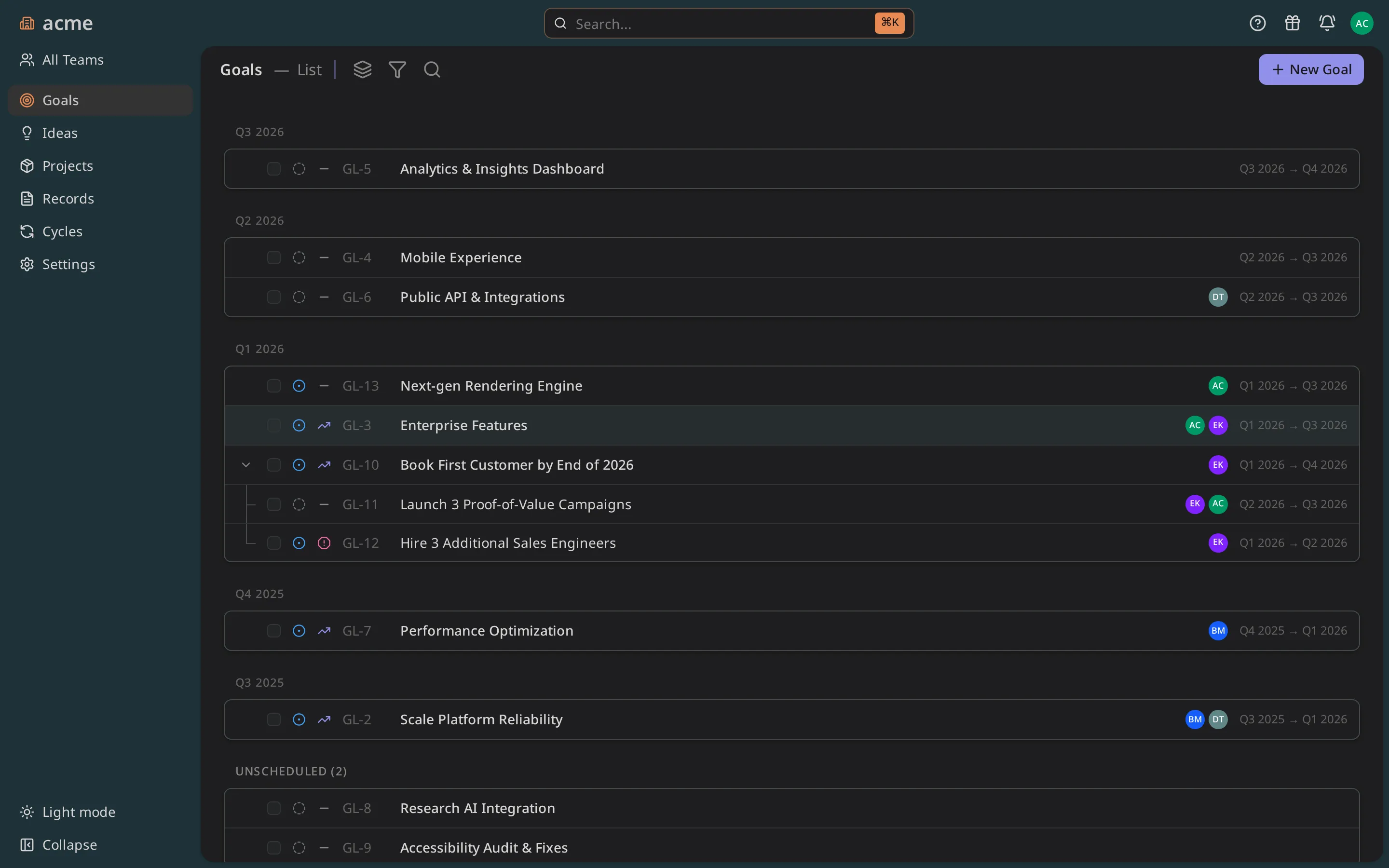
Smoother chart tooltips
The charting library (layerchart) was pinned to 2.0.0-next.53 and migrated to its new tooltip API. Hover states on cycle progress and goal rollup charts are now noticeably crisper — tooltips appear with less jitter and don’t clip at panel edges.
Fixes
- Resolved an issue where the vertical lines on the project Gantt chart seamed to appear in the wrong place. This was due to an issue where the label was positioned on the first day of the month and the line was the first Monday of the month.
1.11.0 — Invite emails, in-app feedback, and support channels
Two things that make Saga PM easier to adopt as a team: invites now arrive in email rather than requiring a link share, and there's a direct feedback channel from inside the app. We also shipped a round of auth hardening and tenant polish under the hood. New features Team invite emails When you invite a teammate from…
Read more
1.11.0 — Invite emails, in-app feedback, and support channels
Two things that make Saga PM easier to adopt as a team: invites now arrive in email rather than requiring a link share, and there’s a direct feedback channel from inside the app. We also shipped a round of auth hardening and tenant polish under the hood.
New features
Team invite emails
When you invite a teammate from the Members settings, they now receive an email with a direct accept link. No more copy-pasting invite URLs. Emails are delivered via Postmark with a clean transactional template that matches the Saga PM brand.
In-app feedback and support
A feedback button in the app shell opens a panel where you can send a message directly to the team. For urgent issues you can also reach us via the support channel linked in the panel. We read everything.
Improvements
Auth hardening
Several hardening fixes landed across the authentication flow: stricter session validation, improved OIDC error messages, and better handling of expired sessions that redirect cleanly to login instead of showing a blank screen.
Tenant polish
Tenant provisioning is faster and more resilient. A handful of edge cases around schema initialization were fixed, and the admin console shows clearer status during setup.
Fixes
- Password recovery flow now works end-to-end in production (Postmark integration was missing from the worker config — now set)
- Fixed a race condition in tenant middleware that could 500 on the first request after a cold start
1.10.0 — Billing and seat management
The billing and seat management milestone is complete. Workspace admins have a self-service billing console, and seat limits are now enforced — the app won't let you exceed the seats you've paid for. New features Self-service billing console A new Billing section in the admin console connects to Stripe. From there you…
Read more
1.10.0 — Billing and seat management
The billing and seat management milestone is complete. Workspace admins have a self-service billing console, and seat limits are now enforced — the app won’t let you exceed the seats you’ve paid for.
New features
Self-service billing console
A new Billing section in the admin console connects to Stripe. From there you can:
- View your current plan and seat count
- Add or remove seats
- Update your payment method
- Download past invoices
Billing is handled by Stripe; Saga PM stores only the Stripe customer ID and subscription ID — no raw card data.
Seat enforcement
When your workspace reaches its seat limit, new members can’t join until a seat is freed or you add more. Existing members are never locked out mid-session — enforcement applies at the invite and login stages. Admins see a clear indicator in the Members page when seats are nearly full.
Public API tokens
Workspace admins can generate long-lived API tokens for programmatic access. Tokens are scoped to the workspace, authenticate via Authorization: Bearer, and appear in the audit log. Useful for CI integrations and custom dashboards.